
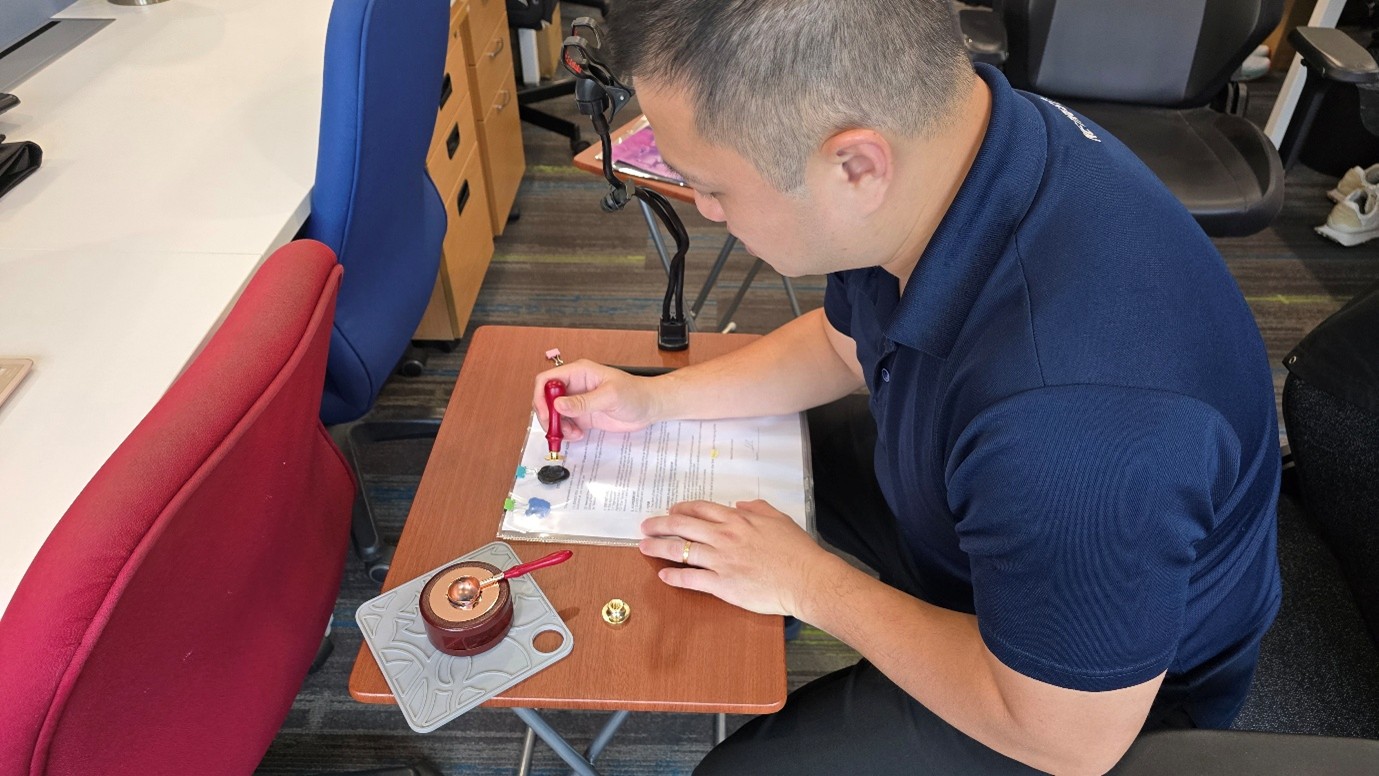

Are you trying to work with or are you trying to understand Digital Signatures from scratch? Or have you attended meetings with vendors where jargon and acronyms like PKI, X509, RSA/ECDSA get thrown around like chaff and cause your brain to overheat? In this article, we aim to explain Digital Signatures by using real life objects and examples to bridge the concept to reality.
Let’s start with a primer video, where we will use letter wax seals to demonstrate what a digital signature is.
Now that you know what a digital signature is, let’s fill in the remaining information you will need to know to work with it.
Use Cases
In our experience, most use cases revolve around document agreements and thus PDF signing. In fact, digital signatures can be regarded as the next evolutionary step up from electronic signatures, which itself has evolved from handwritten signatures. Given the digital nature, it is more versatile and can protect not only documents, but also other use cases such as signing non-document data or protecting data for archival.
For document agreements, digital signatures signed using digital certificates from Netrust [1] enjoy Legal Presumption under the Electronic Transactions Act. Simply speaking, documents with valid Netrust signatures will be accepted as evidence in the court of law without unnecessary scrutiny.
Standards
The process of creating a digital signature follows standards, the prevalent standard now being PAdES for PDF signatures. For non-PDF files, the CAdES standard can be applied. When engaging with the vendors, it would be best to put compliance with standards as one of the requirements. This also helps prevent vendor lock-in.
Applications
As the technology and processes are already mature, digital signatures can be easily created with off the shelf applications. For small amounts or ad hoc signatures, Adobe Reader is readily available. You will however, have to get your own digital certificate that proves your identity. If you have a Singpass account, you can make use of our nSignSG service to utilise Sign with Singpass, which already comes with a digital certificate [2] with your identity as well.
For larger amounts of signatures or if you desire a systematic way of signing and verification, there are workflow solutions such as nSignHub or backend applications like nSignCore to fulfil the requirements. For these, it is best to seek a consultation to work out which solution is a better fit for your requirements.
Signature Verification
As a user, when you receive a digitally signed PDF file, it is important to verify the signature. To do so, utilise PDF applications such as Adobe Reader. When verified, said applications will display the results prominently. Do be wary of applications that display PDF content without verification. Typically, if no results are displayed, no verification is done. For more details, you may refer to this article, which includes detailed examples.
Data Archival
Finally, the digitally signed PDF file needs to be stored securely until it is called upon or the agreement lapses. Conceptually, this is identical to storing signed document papers, except that the ‘digital ink’ doesn’t fade. Consult your organisation’s data retention policies for guidelines.
Conclusion
There is a lot more to know under the hood, but contrary to common belief, you do not need to know everything to work with digital signatures. What we have outlined above covers the basics you will need as a user or when interacting with vendors. If an application is required, it is prudent to involve technical experts to ensure the system and processes are watertight.
To find out more about Digital Signatures or to try some hands-on activities, you can reach out to us to organize a session of Digital Signing 101 Workshop. No cost, no obligations! Just knowledge sharing.
We are also including the answers to some frequently asked questions below that we have encountered before. Check them out.
FAQs
- Can I sign just a section of the file?
This is not possible for PDF signing; digital signatures are applied to the whole document. You can simulate the intent by having certain signers sign at the end of sections instead of at the end of the document.
- I need to make changes after the first signature. How can I do it?
This requires some preplanning. This scenario is typically only required when the next signer needs to put the current date on the form, as compared to the concept of really ‘editing’ the document, which should be finalised before any party signs the document.
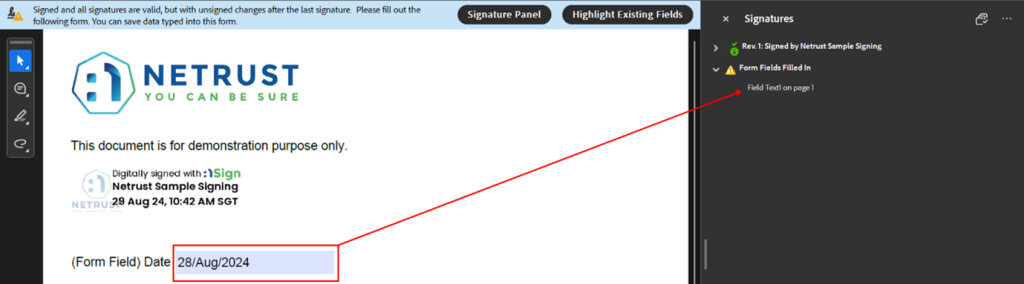
First, you must ensure that the fields are not locked after the first signature. This typically means certain settings need to be done depending on which application is used to create the digital signature. Then, changes can still be made on the fields as required.
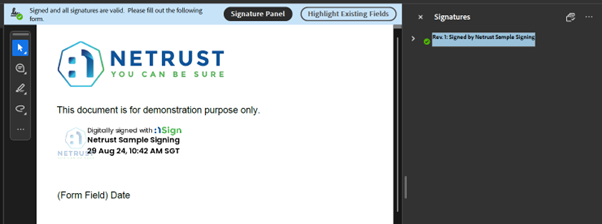
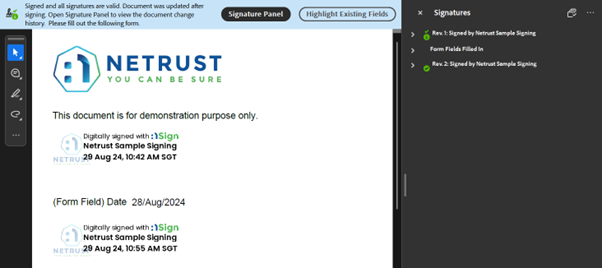
During this stage, any changes made are reflected and past signed versions can be previewed through Adobe Reader. Here are some examples of how the process will look.
With first signature only:
With changes applied:
With second signature applied:
- How can I protect the changes that I have made?
Apply another digital signature on it. Typically, a digital signature should be the last action taken on the file, and it should also lock all fields to prevent further changes afterwards.
- My company’s processes require the signer to sign on every page as an acknowledgement. Can this be done?
Technically, yes. But it is not recommended as every digital signature covers the entire document and comes with its own size overhead. This will bloat up the file size unnecessarily.
It is typically recommended to advise the signer to review the document in its entirety before signing. Alternatively, an electronic signature can be placed on each page to represent the same acknowledgement.
- I have already signed a file, but then I lost my key/token! What should I do?
Well, the good news is the signing process typically embeds your digital certificate (Without the key) into the digital signature, thus ensuring that anyone can verify the signature. So, this does not affect any of the files you have already signed.
However, the bad news is, you will not be able to sign any more files since the key/token is lost. You should also immediately contact the certificate authority to report that this is lost so that they can revoke the certificate to prevent misuse and reissue you a new digital certificate.
- How do I verify a digital signature?
PDF applications like Adobe Reader can be used, it will automatically verify the signature(s) when opening the file. For applications, they can integrate with products which provide an API to verify digital signatures such as nSignCore.
- The digital signature is valid. But how do I know I can trust the person/organisation who signed the file?
First, you must be aware of where the document originates from. If the document came from an organisation, the identity in the signature should be from the organisation or a member of the organisation.
The certificate authority is required to verify the applicant’s identity, including whether they are an authorised staff member from the organisation, before issuing the digital certificate which is signed with a digital signature.
If in doubt, contact the person or organisation to clarify.
- Can someone else see the document content?
Yes, digital signatures does not hide the document content. You can explore encryption (Read up more on our article on Explaining Encryption through real world examples) or utilise password protection measures to fulfil that requirement.
- Can digital signatures and encryption be used together?
Certainly, they are not mutually exclusive.
- Can someone else tamper with the document content?
It is not possible to edit the document data without breaking the digital signature.
- Can someone else reproduce my digital signature after tampering with the document content?
It is not possible to do that unless they can access the key that comes with your digital certificate. Hence, it is important keep your key/token securely.
- Can I know what has been changed, or revert the document back to the original state?
Digital signatures are designed to flag out tampering, but it is not possible to highlight or revert the changes. Therefore, it is still important to retain a copy of the digitally signed document so that a pristine copy is available when required.
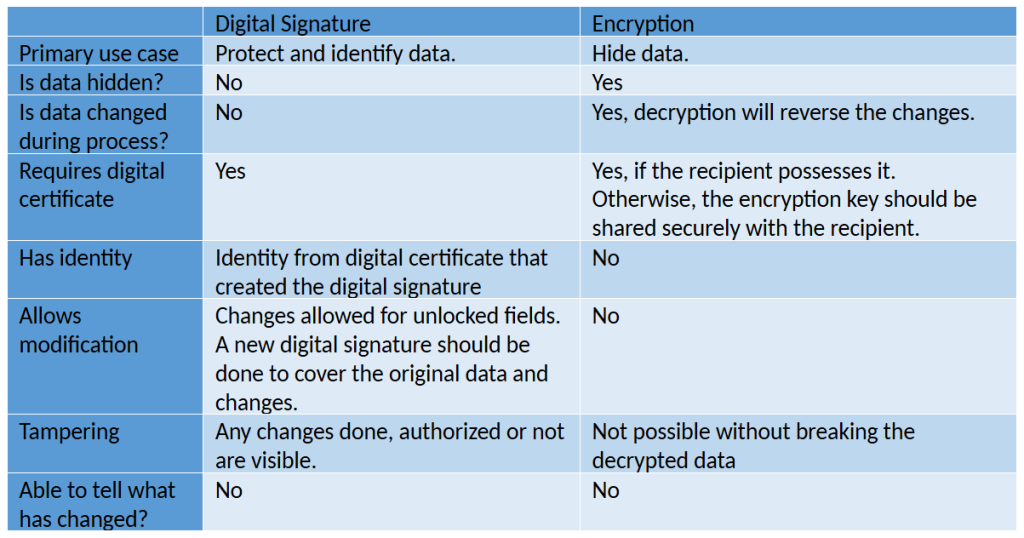
Reference table on the differences between Digital Signatures and Encryption.
[1] Other than Netrust, signatures signed using Sign with Singpass also enjoy legal presumption. Information is accurate at time of publish.

[2] Certificate is issued from Govtech Certificate Authority upon first attempt to sign using Sign with Singpass.
Follow us on LinkedIn for the latest happenings/updates.